
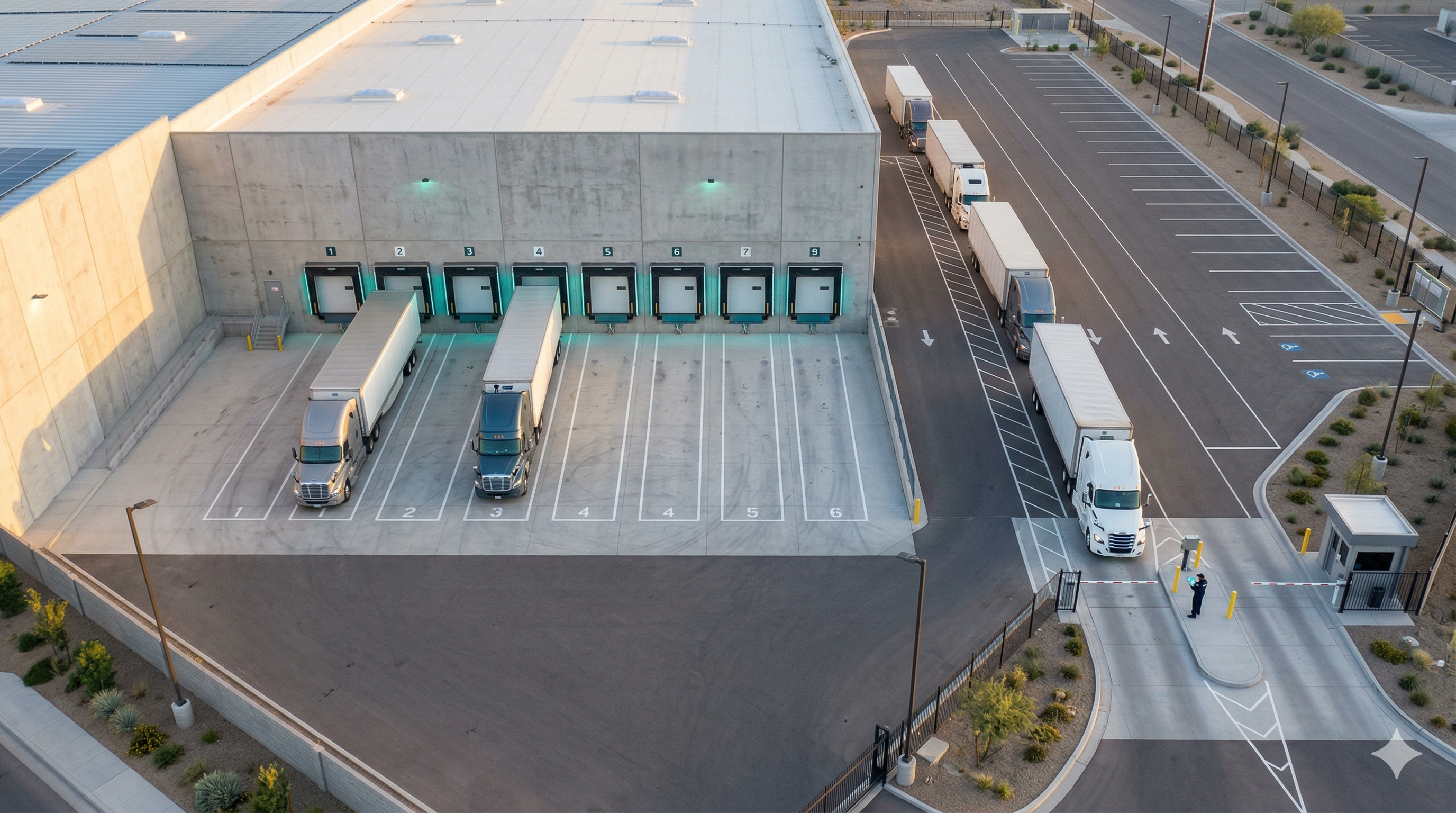
It's 7:03 AM. The operations manager walks into the DC and the first thing she sees is a guard holding a clipboard, scribbling license plates, and talking on a radio with one hand — all at once. In the yard, twelve trucks are idling. Six docks are open. And nobody, including the manager, knows which truck is supposed to be at which dock, or when any of them were supposed to arrive.
By 8:30, four trucks will have been waiting more than 90 minutes. Two will have billed detention. One driver will have left to try again tomorrow. A third shift coordinator will spend the first two hours of her workday on the phone instead of on the floor.
This is not an unusual morning. This is what dock operations look like without appointment scheduling — and the cost is real, measurable, and preventable.
Dock appointment scheduling replaces all of this. Each truck gets a pre-assigned time window at a specific dock door, booked before it leaves origin. When it works, the yard flows like a production line: predictable inputs, measured outputs, no guesswork.
This guide walks you through implementing it at your facility — from mapping your current state to measuring the results. No consulting project required.
Dock appointment scheduling means every inbound or outbound truck is assigned a specific time window — say, 09:00–10:00 — at a specific dock door, before it arrives at your facility.
The contrast with first-come, first-served (FCFS) is fundamental. Under FCFS, trucks arrive whenever they want and wait in line. Under scheduling, trucks arrive when they're expected and go directly to their dock. The first model treats wait time as inevitable. The second treats it as a design failure.
The appointment isn't just a calendar slot. It carries the dock assignment, the cargo type, the expected operation time, and the driver and carrier details. When the truck arrives, the gate guard validates it against the appointment — in seconds, not minutes — and the truck moves in.
Dock scheduling versus first-come-first-served is a longer conversation worth having before you decide which model fits your volume. But if you're handling more than 20 trucks per day with fewer than 10 docks, the answer is almost always: appointments.
The case for appointment scheduling isn't anecdotal. The detention data from the US market tells a consistent story.
The baseline problem looks like this:
What changes after implementation:
The numbers vary by facility size and starting point. The direction is always the same.
See this in action: Read the full case study of a DC that cut detention 73% in three months with dock appointment scheduling and digital check-in.
You cannot design appointment windows without knowing your actual operation. Before touching any software, document these numbers:
Dock inventory:
Volume and turnaround:
Current wait times:
Existing problems:
This data forms your baseline. You'll use it to size windows in Step 2 and measure impact in Step 6. If you don't have it captured anywhere, spend one week manually logging gate arrival, dock connection, and dock release times before moving forward.
The key logistics yard KPIs to track are: gate-to-dock wait time, dock dwell time, dock utilization rate, on-time arrival rate, and no-show rate.
The most common implementation mistake is assigning windows that are too short. Here's the rule of thumb:
Window = average operation time + 15-minute buffer
If your average unload takes 45 minutes, your window should be 60 minutes. This buffer absorbs minor delays without cascading into the next slot.
A few nuances:
For a 60-minute window with a 10-minute gap, each dock can handle roughly 8–10 appointments per 10-hour shift. A DC with 8 docks can theoretically process 64–80 appointments per day. Your actual capacity depends on cargo type mix and operational variability.
Appointment scheduling only works if the rules are clear, enforced consistently, and communicated to all carriers before go-live. Define these four policy areas before launching:
Booking window: How far in advance can a carrier book an appointment? How late? A common setup: open 5 business days out, close 2 hours before the window. This gives operations enough lead time to plan staffing without leaving slots blocked too far ahead.
Cancellation policy: What happens when a carrier cancels? Require cancellation at least 4 hours in advance, or the slot is forfeited and counts against their record. No-shows without notice should carry a consequence — whether a waiting period before rebooking or a flag in the carrier record.
No-show policy: If a truck doesn't arrive by the end of its window, what happens? Define clearly: the dock is released and reassigned. The carrier goes to the back of the queue or to the next available slot. No exceptions in the first 60 days — inconsistent enforcement is the number one reason scheduling implementations fail.
Grace period: How many minutes early or late is acceptable? A 10-minute grace period on either side is standard. A truck arriving 20 minutes early can park in the staging area. A truck arriving 25 minutes late loses its slot.
Write these policies down. Send them to carriers before launch. Post them at the gate.
The appointment policy is the brain. The gate check-in is where it connects to physical reality. If check-in is still clipboard and radio, you've built a system that depends on human memory and correct transcription — both of which fail under pressure.
The minimum viable digital check-in looks like this:
The entire process takes under 90 seconds. The manual alternative takes 3–5 minutes and generates records that can't be audited later.
Digital check-in also creates the timestamp chain you need for detention disputes: gate arrival, dock connection, dock release, and yard exit. When a carrier bills you for 3 hours of wait time and your system shows 42 minutes from gate to dock, the conversation ends quickly.
For a full breakdown of how to implement this process at the gate, see the guide on digital check-in for security gate operations.
The scheduling system is only as good as carrier adoption. A system with 30% compliance is just FCFS with extra steps.
Here's what works:
Lead with the driver's benefit, not yours. The strongest adoption message isn't "we're implementing appointments." It's: "With an appointment, you arrive and go directly to your dock. Without one, you wait up to 3 hours in the yard. Your choice." Drivers lose time and fuel when they wait. They have a direct incentive.
Give them a simple channel. A web portal works for fleet managers booking in advance. For smaller carriers and owner-operators, a WhatsApp bot that handles appointment confirmation and reminders dramatically lowers the friction. Don't force everyone into a portal login — they won't use it.
Send the policy before go-live. Email carriers 2 weeks before launch. Include the booking link, the cancellation and no-show policies, and the grace period. Answer questions before launch day, not during it.
Phase it by carrier tier. Your top 10–15 carriers probably represent 70–80% of your volume. Migrate them first. Once they're on the system and seeing the benefit, word spreads. By the time you enforce appointments for occasional carriers, the system already feels established.
Announce a go-live date and stick to it. Indefinite soft launches become permanent exceptions. Set a date — typically 4–6 weeks after configuration — and communicate clearly: after that date, all trucks require appointments to receive a dock.
If you don't measure from day one, you won't be able to adjust windows, prove ROI, or defend the system internally when someone suggests going back to FCFS.
Track these metrics from the first week:
| Metric | What it tells you | Target (90 days) |
|---|---|---|
| On-time arrival rate | % of trucks arriving within the grace period | >75% |
| Average gate-to-dock wait time | Core operational efficiency metric | <45 minutes |
| Dock utilization rate | Are windows sized correctly? | 75–88% |
| No-show rate | Carrier compliance and policy effectiveness | <8% |
| Detention charges | Hard financial impact | >30% reduction |
| Check-in time | Gate process efficiency | <90 seconds |
Review these weekly for the first 90 days. What you'll typically see:
The core logistics yard KPIs — wait time, utilization, and detention — are your health check throughout.
A regional distribution center in the US Midwest — 12 docks, 28 trucks per day, serving 60 retail locations — ran purely on FCFS for seven years. Scheduling was "too complicated for our carriers." The guard had a paper log and a walkie-talkie.
Before:
The operations director gave the team a six-week deadline to implement and show results without disrupting fulfillment.
What they did:
After six weeks:
The guard's comment on week three: "I thought this would create more work. It's the opposite."
The savings in the first six weeks offset the annual software cost twice over. The DC rolled out the same system to its second facility the following quarter.
For a deeper look at how these results play out at a larger operation, see the full demurrage reduction case study.
Dock appointment scheduling works. But these four mistakes can stall or undo your results.
If your average operation takes 60 minutes and your window is 45, every truck runs over. By mid-morning, you're 30 minutes behind. By afternoon, you're an hour behind. Carriers with valid appointments are waiting, the guard is fielding complaints, and the system looks like it's making things worse — even though the problem is the window size.
Measure actual operation time before setting windows. Add buffer. Tighten later.
The guard is the system's primary user. If they don't understand the policies, can't navigate the check-in tool, or don't have authority to enforce the grace period, every exception goes to a coordinator who's already busy. Bring guards into the configuration process. Train them before launch. Give them a laminated card with the exception protocol.
Every exception you grant teaches carriers that the policy isn't real. One "just this once" at the gate becomes five trucks showing up unscheduled by the following week. For the first 60 days, enforce the policy consistently. After that, you'll rarely need to — because carriers will have internalized it.
If you don't have a baseline wait time, detention cost, and dock utilization before launch, you can't prove the system is working. Two weeks of manual data collection before go-live is worth every minute.
Ready to run the numbers for your facility? Explore how dock management with Docklyx works in practice — and what it typically delivers in the first 90 days.
Define this before launch and enforce it consistently. Most operations redirect unscheduled arrivals to a limited daily FCFS window (e.g., 12:00–2:00 PM) or offer the next available appointment slot — which is typically tomorrow. Some operations, after the first 60 days, turn away trucks without appointments entirely. The right answer depends on your volume and how much margin you have. But be explicit: a vague policy creates consistent exceptions.
It depends on your operation time and shift length. A 10-hour shift with 60-minute windows and 10-minute gaps gives you roughly 9 appointments per dock. A DC with 8 docks can theoretically handle 72 appointments per day. In practice, build in 10–15% slack — not every slot will be used, and some trucks will need more time. Starting at 80% of theoretical capacity and adjusting up is safer than launching at 100% and immediately falling behind.
No. Modern dock scheduling platforms are entirely web-based. The gate guard uses a tablet or smartphone to scan QR codes — the same device they may already use for other tasks. Carriers book appointments from any browser. No turnstiles, no sensors, no IT installation project. The only requirement is a reliable internet connection at the gate and a device with a camera.
Data is your best tool here. After 60 days of digital check-in, you can generate a carrier-level on-time report. Share it with the carrier's operations team — most will not know their actual arrival performance. For repeat offenders, the policy options are: require earlier booking to build in lead time, restrict them to lower-demand windows, or — for persistent patterns — include on-time performance in your carrier evaluation framework. The goal is not to punish but to create a data-backed conversation that FCFS makes impossible.
The process is straightforward: pre-assign time windows, validate at the gate, measure the results. The technology no longer takes months to implement or requires a dedicated IT project.
What it does require is a decision to stop accepting unpredictable wait times as the cost of doing business.
The DC that starts measuring on day one — arrivals, dwell times, detention, utilization — will have data to adjust, prove ROI, and build an operation that scales without adding docks or headcount.
The DC that waits will still be paying $60 an hour to park trucks in its yard.
See how Docklyx handles dock appointment scheduling →
Already have appointments in place but still seeing long wait times? The bottleneck might be at the gate itself — read our guide on digital check-in for security gate operations to see where manual processes typically break down.
Docklyx digitizes the entire yard: appointments, check-in, docks, and real-time traceability.
Request free demo →One email per week. No spam.

Your coordinator spends 3 hours a day on the phone with carriers. Here's how to eliminate those 50 daily calls without replacing a single carrier.

If your trucks are arriving at 5 AM to secure a spot, your system is training them to do it. Here's how to break the FCFS cycle at your DC.
Every blocked dock can cost your warehouse $48,000 to $62,000 MXN per month in labor, delays, and lost capacity. Calculate your real loss.